












.png)
Summary. Remote work is no longer a temporary trend but a permanent shift in how companies operate, driven by technology, employee preferences, economic factors, and access to a global talent pool. To succeed in this environment, businesses need the right remote management tools that support communication, collaboration, productivity, and security. Key categories include communication platforms, project management, time tracking, file sharing, remote desktop access, employee engagement, security, and all-in-one HRIS systems. By integrating these tools, organizations can bridge the gap between physical and virtual workspaces, maintain team connection, and optimize efficiency. Solutions like Omni HR streamline processes, centralize employee data, and automate workflows, empowering remote teams while reducing administrative overhead.
The best tools for remote work fall into eight categories: communication and collaboration, project management, time tracking, file sharing, remote desktop access, employee engagement, security, and all-in-one HRIS. Together, these tools give distributed teams the structure, connection, and productivity they'd otherwise get from a shared office, and they're the foundation any hybrid work model needs to run smoothly. For a deeper look at managing a distributed team day to day, see our HR's Guide to Remote Workforce Management.
Below, we break down what each category does, which tools lead it, and how to choose the right mix for your team.
At a Glance: 8 Remote Work Tool Categories
Top 8 Remote Management Tools
1. Communication and Collaboration Tools
Communication and collaboration tools keep your team connected through real-time messaging, video conferencing, and screen sharing, no matter where everyone's working from, which supports the kind of remote team communication distributed teams rely on. Most also offer whiteboards, file sharing, and shared calendars, so your team has one place to plan and check in together.
Here's how the leading options compare:
Slack — Best for ongoing async chat
Slack organizes conversations into channels by team, project, or topic, so your team can find context quickly instead of scrolling through one long feed. Its integration library connects with most of the other tools on this list, which lets approvals, alerts, and updates surface directly in the channels your team already checks.
- Threaded conversations and searchable message history
- Huddles for quick audio or video check-ins without scheduling a meeting
- Deep integrations with project management, HRIS, and file-sharing tools
Microsoft Teams — Best for teams already on Microsoft 365
Teams brings chat, video calls, and document collaboration into the same workspace your team uses for Word, Excel, and SharePoint, so files stay in one place instead of scattered across email attachments. It suits organizations that want communication and document editing to live side by side.
- Real-time co-authoring on Office documents inside a call or chat
- Built-in video conferencing with no separate app required
- Granular permission controls suited to larger or regulated organizations
Google Meet — Best for lightweight, browser-based video calls
Meet runs entirely in the browser, so your team can join a call without installing software or managing an account beyond their existing Google Workspace login. It works well for teams that want video conferencing without a heavier collaboration suite attached.
- One-click scheduling from Google Calendar
- Live captions and noise cancellation built in
- Straightforward guest access for calls with people outside your organization
Zoom — Best for scheduled video calls and webinars
Zoom is built around reliable video quality at scale, which makes it a strong choice for all-hands meetings, webinars, and external calls with clients or candidates. Breakout rooms let you split a larger call into smaller working groups without leaving the platform.
- Breakout rooms for workshops and training sessions
- Webinar hosting for larger audiences
- Recording and transcription for meetings your team can't all attend live
See our Slack Tips and Tricks for More Productive HR Teams for more on getting the most out of your communication stack.
2. Project Management and Task-Tracking Tools
Project management tools help your team organize workloads, assign tasks, set deadlines, and track progress, so nothing falls through the cracks when you're not sharing a physical space. Look for to-do lists, dashboards, automation, and integrations with your other tools.
Asana — Best for cross-functional project visibility
Asana lets teams view the same project as a list, board, timeline, or calendar, so different team members can work in the format that suits them while staying aligned on the same underlying tasks. Its reporting dashboards give managers a clear read on where work is stalling.
- Multiple project views (list, board, timeline, calendar)
- Workflow automation for recurring task sequences
- Portfolio-level reporting across multiple projects
Trello — Best for simple, visual task tracking
Trello's card-and-board layout gives smaller teams an easy way to visualize work in progress without a steep learning curve. It suits teams that want something they can set up in minutes rather than configure extensively.
- Drag-and-drop Kanban boards
- Power-Ups that add automation and integrations as needed
- Low barrier to entry for teams new to project management software
ClickUp — Best for teams that want one tool to replace several
ClickUp combines task management, docs, goals, and time tracking in a single platform, which appeals to teams looking to consolidate tools rather than add another point solution. The tradeoff is a steeper setup process given how much it covers.
- Customizable views spanning tasks, docs, and goals
- Built-in time tracking and workload management
- Extensive automation and template library
Monday — Best for visual, customizable workflows
Monday's color-coded boards make it easy to see project status at a glance, and its no-code automation builder lets teams set up custom workflows without engineering support. It works well for teams that want structure without rigidity.
- Highly visual, color-coded status tracking
- No-code automation builder
- Templates for common HR and operations workflows
ProofHub is worth a look too, since it combines project management with team collaboration on one platform, giving remote teams communication and document collaboration built into the same tool.
3. Time Tracking and Productivity Tools
Time tracking tools help your team stay focused and accountable, track billable hours for freelancers and contractors, and manage schedules across time zones. They're built around time tracking, productivity reports, and invoice generation, not micromanagement.
Toggl — Best for simple, one-click time tracking
Toggl's interface is built around starting and stopping a timer with minimal friction, which makes it a good fit for teams that want accurate time data without asking employees to fill out timesheets manually at the end of the week.
- One-click timer with idle detection
- Reporting broken down by project, client, or team member
- Integrations with most major project management tools
Harvest — Best for time tracking tied to invoicing
Harvest pairs time tracking with invoicing, so agencies and consultancies can turn logged hours directly into client invoices without re-entering data in a separate billing tool.
- Time tracking linked directly to invoice generation
- Expense tracking alongside billable hours
- Visual reports on project budgets versus actual time spent
Clockify — Best for free time tracking at scale
Clockify offers unlimited users on its free tier, which makes it a practical starting point for growing teams that want time tracking without an upfront cost tied to headcount.
- Unlimited users and time entries on the free plan
- Time tracking by project, task, and billable status
- Browser extension and desktop app for tracking without switching tabs
RescueTime — Best for personal productivity insights
RescueTime tracks time automatically in the background based on the apps and websites someone uses, then surfaces a productivity score, which suits individuals who want self-awareness around focus time rather than a team-wide time tracking mandate.
- Automatic tracking with no manual timer required
- Focus session blocking for distracting sites and apps
- Weekly reports on time spent by category
If your team is exploring async-first ways of working, our guide on implementing an asynchronous work environment pairs well with these tools. For the HR side of time tracking specifically, see our Guide to Time and Attendance.
4. File Sharing and Cloud Storage Tools
File sharing tools give your team a secure, centralized place to store and collaborate on documents, so you can leave the email-attachment approach behind. Look for file versioning, access control, password protection, and automatic backups.
Google Drive — Best for teams already using Google Workspace
Drive integrates directly with Docs, Sheets, and Slides, so files can be created, edited, and shared without leaving the browser. Shared drives give teams a common space that persists even as individual members join or leave.
- Real-time collaborative editing on native file formats
- Shared drives owned by the team, not an individual
- Generous storage tiers bundled with Google Workspace plans
Dropbox — Best for straightforward file sync across devices
Dropbox focuses specifically on file storage and sync, keeping a folder on every device in sync automatically, which suits teams that want a dedicated file tool rather than a bundled suite.
- Smart Sync keeps local storage light while files stay accessible
- File recovery and version history
- Broad third-party integration support
OneDrive — Best for teams standardized on Microsoft 365
OneDrive ties directly into Windows and Microsoft 365, so files saved from Word, Excel, or Teams sync automatically without a separate upload step.
- Native integration with Windows File Explorer
- Co-authoring alongside Microsoft Teams and Office apps
- Enterprise-grade compliance and retention controls
Box — Best for enterprise-grade content governanceBox is built around granular permissions and compliance certifications, which makes it a common choice for larger organizations in regulated industries that need tight control over who can access what.
- Fine-grained permission and access controls
- Extensive compliance certifications
- Workflow automation for content approval processes
5. Remote Desktop and Access Tools
Remote desktop tools let your team securely access and control a computer from a different location, which makes troubleshooting technical issues and completing tasks from anywhere straightforward. They're built for screen sharing, file transfers between computers, and temporary access grants.
TeamViewer — Best for cross-platform IT support
TeamViewer works across Windows, Mac, Linux, iOS, and Android, which makes it a common choice for IT teams supporting a mixed-device workforce.
- Cross-platform remote access and control
- File transfer between connected devices
- Session recording for support and compliance purposes
AnyDesk — Best for low-latency remote access
AnyDesk is built for fast, low-latency connections, which makes it well-suited to tasks that need responsive real-time control, like design work or troubleshooting on a lagging connection.
- Low-latency screen sharing optimized for speed
- Lightweight installation with a small file size
- Custom client branding for IT teams supporting external users
Chrome Remote Desktop — Best for free, simple remote access
Chrome Remote Desktop runs as a browser extension, giving individuals and small teams a no-cost way to access another computer without installing dedicated software.
- Free to use with a Google account
- Simple setup through the Chrome browser
- Suited to occasional access rather than heavy IT support workloads
Splashtop — Best for remote access at scale with lower licensing costs
Splashtop positions itself as a lower-cost alternative to some enterprise remote access tools, aimed at IT teams supporting a larger number of devices.
- Multi-monitor support for remote sessions
- Centralized management console for IT admins
- Session logging for audit purposes
6. Employee Engagement Tools
Employee engagement tools help you maintain connection and culture across a distributed team through recognition systems, employee survey creation tools, and social features that recreate some of the informal moments an office provides.
Culture Amp — Best for structured engagement surveys
Culture Amp is built around survey design and analysis, giving HR teams a way to measure engagement, gather feedback, and benchmark results against industry data over time.
- Pre-built and customizable survey templates
- Benchmarking against industry and company size
- Action-planning tools tied directly to survey results
Motivosity — Best for peer-to-peer recognition
Motivosity centers on employees recognizing each other, with recognition visible across the team so contributions get noticed beyond a direct manager relationship.
- Peer-to-peer recognition with visible team feed
- Points-based rewards employees can redeem
- Manager insights into team sentiment and recognition patterns
Bonusly — Best for lightweight recognition tied to company values
Bonusly lets employees tag recognition to specific company values, which helps reinforce culture in a distributed team where those values aren't reinforced through daily in-person interaction.
- Recognition tagged to core company values
- Integration with Slack and Microsoft Teams for in-the-flow recognition
- Reporting on recognition trends across teams
WorkTango — Best for combining recognition and engagement surveys
WorkTango combines recognition and survey tools in one platform, giving HR teams a single place to both measure engagement and act on it through recognition programs.
- Combined recognition and survey functionality
- Goal-setting and continuous feedback tools
- Manager dashboards for team-level engagement trends
Platforms like Omni support this too, with employee self-service features that keep your team engaged with company culture and employee wellbeing, even when everyone's remote, which in turn supports employee satisfaction.
7. Security and Data Protection Tools
Security tools protect your team's sensitive data and devices from online threats, which matters more the more distributed your team becomes. Look for password managers, firewalls, VPNs, and backup and recovery services, scaled to how sensitive your work is.
LastPass — Best for team password management
LastPass centralizes password storage and sharing, so your team can access shared logins securely without passwords circulating over email or chat.
- Shared vaults for team and department credentials
- Dark web monitoring for compromised credentials
- Single sign-on and multi-factor authentication support
Norton — Best for device-level threat protection
Norton focuses on antivirus and malware protection at the device level, which suits teams whose remote employees are working from personal or lightly managed devices.
- Real-time malware and threat detection
- VPN bundled into higher-tier plans
- Dark web monitoring for personal information
Express VPN — Best for secure connections on public or home networks
Express VPN encrypts a device's internet connection, which matters when remote employees are working from coffee shops, co-working spaces, or home networks with weaker security than an office.
- Encrypted connections across a wide server network
- Split tunneling to route only sensitive traffic through the VPN
- Apps across desktop and mobile platforms
Acronis — Best for backup and disaster recovery
Acronis focuses on backing up devices and systems, so a lost laptop or a ransomware incident doesn't mean losing the underlying data permanently.
- Automated, scheduled backups
- Ransomware protection built into the backup process
- Cloud and local backup options
See how Omni HR keeps employee data secure for an example of what this looks like on the HR side specifically.
8. All-in-One HRIS
An all-in-one Human Resource Information System (HRIS) brings task management, time tracking, performance management, and payroll into a single platform, so your team isn't juggling logins across five different tools or hunting for employee data scattered across systems. This gives you one centralized, accessible database and reduces the chance of errors that come from manual data entry across multiple tools.
Omni HR — Best for distributed teams operating across Asia
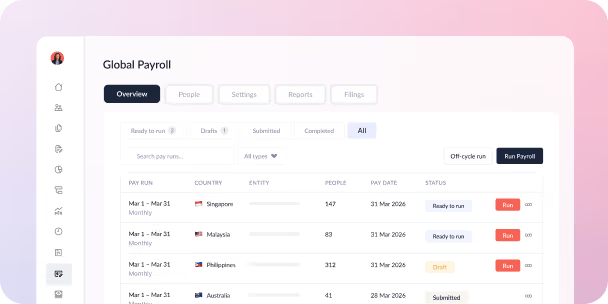
Omni is the all-in-one HRIS and multi-country payroll platform built for teams operating in and across Asia. Rather than bolting local compliance onto a global platform as an afterthought, we build country-specific statutory requirements directly into the system, so HR teams managing distributed employees across Singapore, Malaysia, the Philippines, and beyond get one centralized source of truth instead of a patchwork of local tools.
- Multi-country payroll with native statutory compliance (CPF, EPF/SOCSO/EIS, SSS/PhilHealth/Pag-IBIG, and more) across 200+ countries
- Employee self-service portal with time-off requests that route automatically through customizable approval workflows
- Direct Slack integration, so managers can approve leave without leaving the messaging platform your team already uses
- Agentic AI throughout the platform, including Mino, Omni's AI agent, which gives employees and HR teams instant answers without waiting on a ticket
- Real-time reporting and dashboards across every entity you operate in
- 7-day free trial, with public pricing starting at $3/employee/month
BambooHR — Best for small businesses centralizing core HR
BambooHR focuses on core HR functions like employee records, time-off tracking, and onboarding, which makes it a common starting point for smaller teams centralizing HR data for the first time.
- Centralized employee database with customizable fields
- Time-off tracking and approval workflows
- Onboarding checklists and new-hire portals
Gusto — Best for US-based small business payroll
Gusto is built primarily around US payroll, tax filing, and benefits administration, which suits smaller US-based teams whose HR needs center on getting payroll and compliance right domestically.
- Automated US payroll tax filing
- Benefits administration alongside payroll
- Employee self-service for pay stubs and tax documents
Rippling — Best for combining HR with IT device management
Rippling extends beyond core HR into IT functions like device and app provisioning, which appeals to teams that want employee onboarding to also trigger laptop setup and software access in the same workflow.
- Combined HR, IT, and finance workflows in one platform
- Automated app and device provisioning tied to onboarding
- Global payroll and EOR options for distributed teams
Omni's employee self-service portal lets your remote employees submit time-off requests that route automatically to the right manager, and it integrates directly with tools like Slack, so approvals happen without leaving the messaging platform your team already uses.
See 5 Reasons to Switch to an All-In-One HR Software for more on making that case.
Bring Your Remote Team Together with Omni
An HRIS is one of the most effective ways to keep a remote team organized, connected, and set up for growth. Omni is the all-in-one HRIS and multi-country payroll platform built for teams operating across Asia, giving you centralized HR and payroll across 200+ countries, automatic statutory compliance updates, and dedicated support from teams on the ground in the markets you operate in.
Our employee self-service portal empowers remote employees to submit their own time-off requests, which route automatically to the right manager through customizable approval workflows. Omni integrates directly with the tools your distributed team already relies on, including Slack, so managers can approve requests without leaving the messaging platform they check every day. Agentic AI runs throughout the platform too: Mino, Omni's AI agent, gives your team instant answers to their own HR questions, freeing your HR team from repetitive requests and giving them back time for higher-impact work.
Start your 7-day free trial now, or book a demo with our team to see how Omni can help improve your remote business functions.
Frequently Asked Questions
At minimum, your team needs a communication tool (like Slack or Zoom), a project management tool (like Asana or Trello), and secure file storage (like Google Drive or Dropbox). As your team grows, time tracking, security, and an all-in-one HRIS become just as essential for keeping things organized and protected.
The best tools depend on your role and team size, but most remote workers rely on a communication platform, a task management tool, and cloud storage as their core toolkit, with time tracking and security tools layered in based on need.
Slack, Microsoft Teams, and Zoom cover real-time collaboration, while Asana, Trello, and ClickUp handle project-level collaboration. For document collaboration specifically, Google Drive and Dropbox are the most widely used.
An all-in-one HRIS like Omni centralizes the pieces that would otherwise sit in separate tools, task management, time tracking, performance, and payroll, giving you one system instead of several, which is especially useful once your remote team grows past a handful of people.



.avif)
.avif)